TerminalFix Unmasked: How Hackers Hide Malicious Executables Inside PNG Files with Steganography
In an era where malware delivery mechanisms are becoming increasingly sophisticated, the TerminalFix campaign offers a chilling reminder that even innocent-looking image files can be weaponized. Microsoft Security Research recently published a detailed analysis of this multistage intrusion, revealing that threat actors used PNG steganography to conceal their payloads. By embedding a complete Windows executable into the pixel data of a valid-looking image, the attackers managed to bypass traditional security filters and maintain stealth across the infection chain.
In this deep dive, we’ll dissect the technical details of how TerminalFix leverages PNG steganography, analyze the indicators of compromise (IOCs) shared by the researchers, and explain why this technique is both clever and dangerous. For cybersecurity professionals and ethical hackers, understanding this attack vector is crucial for building resilient defenses against data exfiltration and malware infiltration.
The Anatomy of a Steganographic PNG
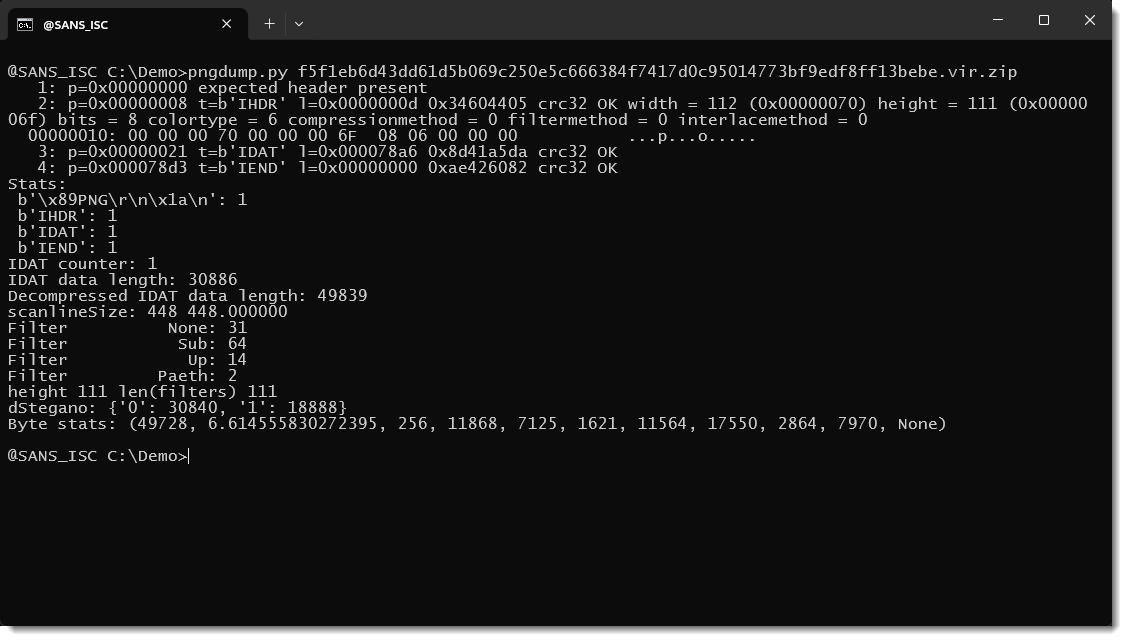
The TerminalFix campaign isn’t your run-of-the-mill malware dropper. Instead of relying on conventional payload delivery methods, the attackers crafted PNG files that appear perfectly legitimate at first glance. When researcher’s from Microsoft’s security team analyzed the first image (SHA256: f5f1eb6d43dd61d5b069c250e5c666384f7417d0c95014773bf9edf8ff13bebe), they used a tool called pngdump.py to parse the file structure. The results were telling: the PNG had a proper header, contained the expected chunks (IHDR, IDAT, IEND), and had no appended data or hidden metadata that could carry a payload. The IDAT chunk—the compressed pixel data—was successfully decompressed, confirming the file was structurally valid.
But the real magic lay in the pixel data itself. Upon inspecting the decompressed IDAT stream, the researchers noticed unusual ASCII strings: "MZ", ".text", ".data" — signatures that immediately point to a Windows Portable Executable (PE) file. It was a classic case of steganography, where the payload is hidden within the image’s pixel values. However, the technique deviated from typical steganographic practices in a significant way: the attackers used every bit of the pixel data to store the payload, completely sacrificing the original image content.
Decoding the Pixel Data: Filters and Raw Bitmap Extraction
To extract the hidden PE file, the researchers had to reverse the PNG encoding process. The image consisted of 111 scanlines, each 112 pixels wide. With a color type of 6 (RGBA), each pixel is represented by four bytes: red, green, blue, and alpha (transparency). That gives 448 bytes per scanline. Each scanline begins with a filter byte—in this case, the first scanline used the SUB filter (type 01), meaning each pixel’s RGBA values were subtracted from the previous pixel’s values to reconstruct the original data.
By using the --raw option in pngdump.py, the researchers bypassed all filter decoding and obtained the raw bitmap data directly. There, clearly visible, was the familiar DOS stub: "This program cannot be run in DOS mode." The first eight bytes of the raw data indicated the length of the embedded PE file (49,720 bytes). Carving out that exact chunk and calculating its hash revealed a genuine Microsoft executable: LockScreenContentServer.exe. This file is a trusted, signed binary, making it ideal for DLL sideloading—a technique where a malicious DLL is placed in the same directory as a legitimate executable, causing the executable to load the malicious code when run.
The Unusual Choice: All Bits Used, No Visual Deception
Most steganographic tools employ least significant bit (LSB) insertion, where only a few bits of each pixel are altered to embed data. This preserves the visual appearance of the image, making it nearly impossible to distinguish from the original. The TerminalFix attackers, however, took a different approach: they used all available bits for payload storage. The original image is completely lost—the resulting PNG renders as static or noise, as you can see in the samples provided by the researchers. This is a deliberate trade-off: by sacrificing visual fidelity, they maximize the payload capacity. In this case, a 49KB executable fits neatly inside a small 112x111 pixel image.
But the campaign didn’t stop with a single embedded executable. The researchers also analyzed two additional PNG files. These contained a malicious DLL split into two parts. By concatenating the two extracted portions, the full DLL payload is reassembled. This fragmentation technique further complicates detection, as no single file appears to contain the complete malicious code.
Implications for Cybersecurity and Defenders
The TerminalFix campaign highlights several critical aspects of modern cybersecurity threats. First, steganography remains a powerful but often overlooked method for evading network defenses. Traditional security tools often ignore image files, focusing on executables, scripts, and documents. By embedding payloads in images, attackers can slip through traffic filters, email gateways, and even file integrity monitoring systems.
Second, the use of legitimate Microsoft binaries for sideloading reduces the chance of detection by application whitelisting or reputation-based systems. Even if the malicious DLL is flagged, the presence of a signed executable in the same folder may confuse analysis. This underscores the importance of monitoring for unusual file combinations and unexpected process spawning, rather than relying solely on hash blacklisting.
Finally, the fact that the attackers didn’t bother to preserve image quality suggests they were prioritizing functionality over stealth—at least in the visual domain. However, the very existence of these files would likely go unnoticed by many users, as they are rarely rendered. In a world where users are trained to be cautious of suspicious links and attachments, a poorly rendered image may not raise alarm.
Lessons Learned: Enhancing Detection and Response
For security researchers and incident responders, the TerminalFix campaign serves as a valuable case study. It reinforces the need to inspect all file types, especially those that are often ignored. Tools like pngdump.py are essential for dissecting image files and revealing hidden data. But detection goes beyond static analysis. Network monitoring should also flag anomalies such as unusually small or large PNG files, images with unexpected dimensions, or files that exhibit poor visual quality when rendered.
Moreover, behavioral detection is key. When an executable like LockScreenContentServer.exe runs and loads a DLL from the same directory, that behavior should trigger alerts. Endpoint Detection and Response (EDR) solutions can be configured to monitor for sideloading patterns, and threat hunting teams should proactively search for such indicators across their environments.
Finally, the use of steganography in malware campaigns is not new, but its adoption by threat actors shows a growing sophistication. Organizations must stay ahead by integrating steganography detection into their security stacks. This includes not only image parsing but also checking the entropy of file contents, which can indicate embedded data.
Conclusion
The TerminalFix campaign is a stark reminder that in the world of hacking, nothing is as innocent as it seems. By hiding a full Windows executable inside a PNG file using all-bit steganography, the attackers achieved a level of stealth that challenges conventional defense mechanisms. Their choice to sacrifice image quality for payload capacity is a calculated move that many security analysts might overlook. As we continue to defend against evolving threats, understanding such techniques and implementing comprehensive security practices—from file inspection to behavior analytics—is not just recommended; it’s essential. Stay vigilant, and remember that sometimes the most dangerous payloads come in the most pixelated packages.