OXO v2.10.3: The Modular Security Scanner That Plays Well With Others
The cybersecurity landscape is a mess of fragmented tools, each solving a single problem while demanding its own workflow. Enter OXO v2.10.3, the modular security scanning orchestrator that is turning heads in the open-source community. This isn't just another vulnerability scanner; it's a framework that combines specialized agents for vulnerability detection, reconnaissance, and fingerprinting across networks, web apps, mobile apps, and APIs. If you are tired of duct-taping Nmap outputs to ZAP reports, this tool is your new best friend.
OXO is fundamentally built for modularity, scalability, and simplicity. It doesn't ask you to replace your favorite tools; instead, it wraps them into a cohesive engine that works in tandem to find vulnerabilities and perform actions like recon and enumeration. Whether you are a penetration tester mapping an attack surface or a red teamer looking for a scalable solution, OXO offers a Docker-based approach that makes complex scanning pipelines feel like a single command.
What is OXO? A Closer Look at the Architecture
At its core, OXO is a security scanning framework that treats every tool as an "agent." The Engine is the orchestrator that manages the data flow between these agents. This architecture allows for a level of automation that is rare in manual security research. Instead of running a DNS brute-force tool, waiting for the output, and then feeding that data into a web scanner, OXO automates the entire lifecycle. It is built specifically to support the "shift-left" philosophy, allowing security teams to integrate deep scanning into their CI/CD pipelines without needing a PhD in shell scripting.
Installation and Deployment
Before you start, note that Docker is required to run scans locally. If you haven't installed Docker yet, follow the official instructions on their site to get set up. OXO ships as a Python package on PyPI, making installation a breeze for those already using pip. Simply run the standard install command to get the oxo and ostorlab CLI commands on your system. For those who prefer containerized environments, you can also pull the publicly available image and run it in a container environment.
The Agent Store: Your Arsenal for Recon and Exploitation
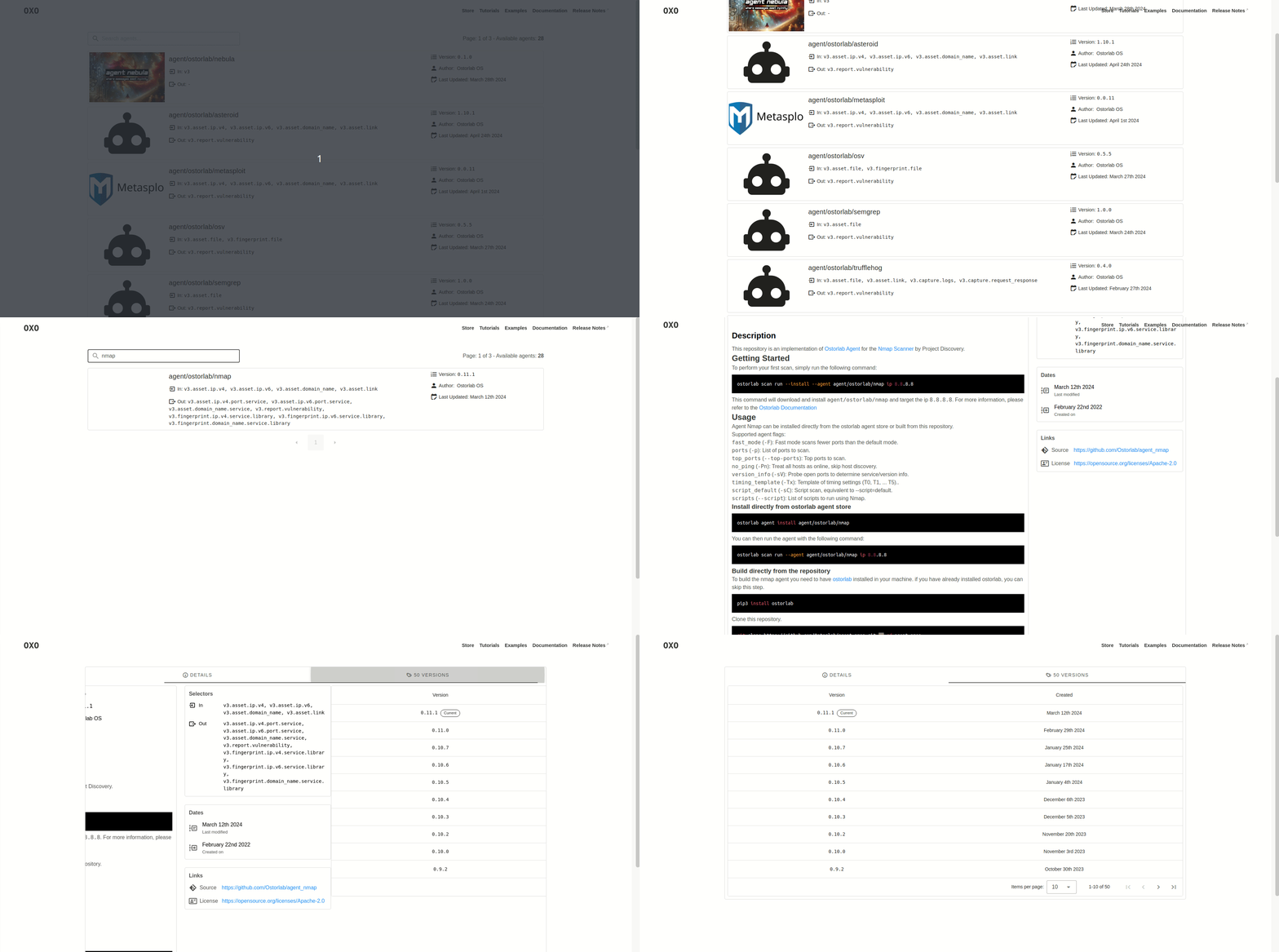
One of the most compelling features OXO brings to the table is its built-in "Store." Think of it as an app store for hacking tools. OXO boasts dozens of agents that cover every stage of an attack simulation. This includes heavy hitters like Nmap, Nuclei, and Tsunami for network scanning, as well as web application scanners like ZAP. For web fingerprinting, you can pull in WhatWeb and Wappalyzer to identify technologies utilized by your target.
The tool doesn't stop at web and network either. It includes DNS brute-forcing capabilities via Subfinder and Dnsx, and even integrates malware file scanning through VirusTotal. This breadth of coverage means OXO can handle a wide array of asset types, providing comprehensive security coverage across different platforms and protocols.
Running Your First Scan: Simplicity in Execution
To run any of these tools combined, you do not need to chain commands manually. You simply invoke the OXO CLI and define your target. For example, running a command against the target IP address 8.8.8.8 is a single line of code. The system handles the heavy lifting: it downloads the required agents (shipped as standard Docker images), installs them, and orchestrates the scan flow without further input from you.
While the scan runs, you can check the scan status using a straightforward status command. Once the scan has completed, you can access the scan results directly from the CLI. If you notice a false positive or a resource drain, you can also stop a running scan instantly without killing your whole Docker stack. This level of control is critical for agile security testing.
On-Prem and Logging Configurations
For enterprises running OXO as an on-prem scanner, the tool offers persistent logging features. Using the --persist-logs flag writes scanner logs to disk, ensuring you have a record of all activities for compliance or post-incident analysis. By default, logs are written to ~/.ostorlab/scanner.log, but you can easily redirect the output to another file or change the persisted log verbosity to match your debugging needs.
Developing and Publishing Your Own Agents
While the store is impressive, the real potential for OXO lies in its extensibility. The framework allows you to write your first agent with a full tutorial, making it accessible even to those new to tool development. The steps are basically as follows: write the agent logic, containerize it, and integrate it with the OXO API. Once you have written your agent, you can publish it on the store for others to use and discover.
This creates an ecosystem where the community fuels the tool's growth. The store handles agent building automatically and will pick up new releases from your Git repository. This means that as you push updates to your tool, the distribution to the community is instant and seamless. This is a major step forward for open-source collaboration in cybersecurity.
Why OXO Matters for Modern Offensive Security
In a field where time is money, OXO represents a shift toward efficiency. Implementations of popular tools are standardized under one interface, reducing the friction of switching between disparate UIs. This standardization is crucial for generating consistent reports and for automating the "boring" parts of reconnaissance, allowing security researchers to focus on complex logic and exploitation.
Furthermore, the orchestration engine addresses the issue of tool interoperability. By combining specialized agents, it ensures that the output of a network scan can automatically inform the web application scan, creating a context-aware security assessment. This automated flow of information between agents is what sets OXO apart from simple script wrappers.
Community and Contributions
As an open-source project in a rapidly developing field, OXO is always open to contributions, whether it be in the form of a new feature, improved infrastructure, or better documentation. The project maintains an active developer base that encourages contributions from the broader hacking community. They have publicly thanked specific contributors for their help in making OXO a better tool, showcasing a transparent and collaborative development process.
If you are looking to contribute, the areas of need usually involve integrating more security tools, improving the visualization of scan results, and enhancing the performance of the core engine. Even if you are not a developer, simply using the tool and reporting bugs or suggesting improvements is a valuable way to give back to the ecosystem.
Conclusion: The Future of Modular Scanning
OXO v2.10.3 is more than just a security scanner; it is a statement on how we should approach cybersecurity tooling. By emphasizing modularity and orchestration, it solves the "swivel chair" problem that plagues many security operations centers. Whether you are a solo researcher, a startup, or an enterprise SOC, OXO provides the structure needed to conduct thorough, repeatable, and scalable security assessments.
As the threat landscape continues to evolve, tools like OXO will become essential for keeping up with the velocity of attacks. It bridges the gap between open-source versatility and enterprise-grade orchestration. So, dive into the store, pull some agents, and start scanning smarter, not harder.