X86CSS: An x86 CPU Emulator Written in CSS
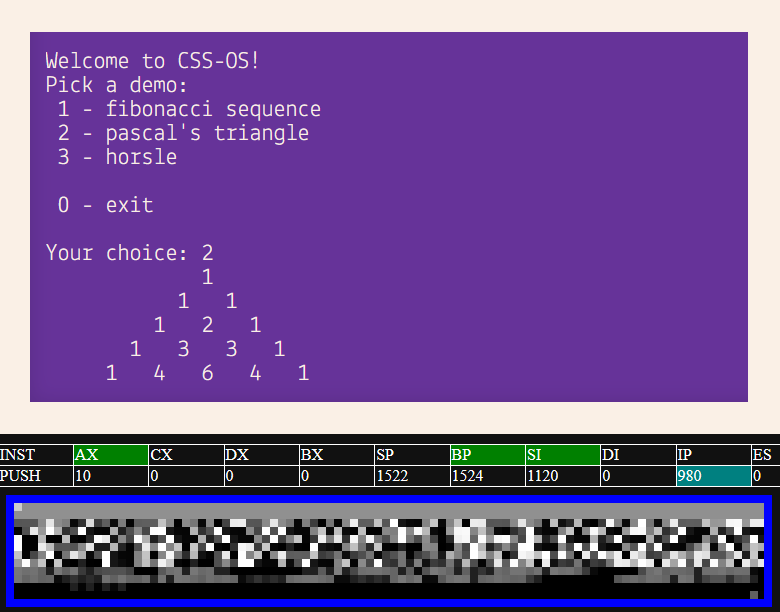
As a cybersecurity enthusiast, it's always exciting to come across innovative projects that push the boundaries of what we thought was possible with web development. Meet X86CSS, an x86 CPU emulator written entirely in CSS - yes, you read that right! Without any JavaScript required, this impressive project showcases the power and versatility of Cascading Style Sheets. In this article, we'll delve into the details of how it works, its limitations, and what makes it a fascinating example of web development.
X86CSS is more than just an emulator; it's also an artistic representation of x86 architecture, showcasing that computers are indeed made for art and fun. The project's creator has implemented most of the x86 architecture, but not every single instruction or quirk, as some of them are unnecessary and not worth adding. This approach allows us to get a better understanding of how the original 16-bit x86 CPU works.
The emulator uses a few CSS features such as `if()` statements, style queries, and custom @functions that are not available in all browsers. At this time, it's only compatible with Chromium-based browsers like Chrome. The project relies on these CSS features to create an x86-like environment where we can run our own software.
One of the most interesting aspects of X86CSS is its use of a C program compiled into native 8086 machine code being executed fully within CSS. This has been achieved through a combination of clever use of browser-specific technologies and some creative coding techniques.
So, how does it work? The process starts with compiling a C program using GCC and then implementing every instruction needed for the emulator to run. The `build_c.py` script does this build with the correct flags, making the program.bin/start files, which can be loaded into the emulator at memory address 0x100.
For users who want to write their own software in x86 assembly, they can create a file called `program.bin`, put the address of the `_start()` function as a number, and run `build_css.py` with Python3. The output will be stored in `x86css.html`.
In conclusion, X86CSS is an impressive example of web development that showcases the power of CSS and its capabilities beyond mere styling. It's also a testament to the creativity and ingenuity of its creator, who has managed to create an x86-like environment using only CSS.
So, what can you do with this emulator? You can run your own software in it, once you've compiled it yourself. Keep in mind that you need to manually compile your code because there's no built-in compiler available for the current state of X86CSS.
The project is still evolving, and its creator is eager to improve it and make it compatible with more browsers. With its unique blend of artistry, web development, and x86 architecture, X86CSS is sure to capture the imagination of developers and enthusiasts alike.