**Virtual Stream Deck: How A $30 Touchscreen Turns Any PC Into A Macro Powerhouse**
Elgato's recent move to introduce Virtual Stream Deck has transformed the macro hardware landscape. By shifting the focus from proprietary buttons to any display that can host a virtual panel, Elgato has redefined what it means for users to own a macro pad.
The practical implications of this shift are far-reaching. Take, for instance, Nick Moe's experiment with pairing a $30 capacitive touchscreen with Virtual Stream Deck on Windows. His findings challenge the conventional wisdom that a cheaper screen equals a cheaper Stream Deck. In reality, it is not just about the cost of the touch surface but also about software and platform compatibility.
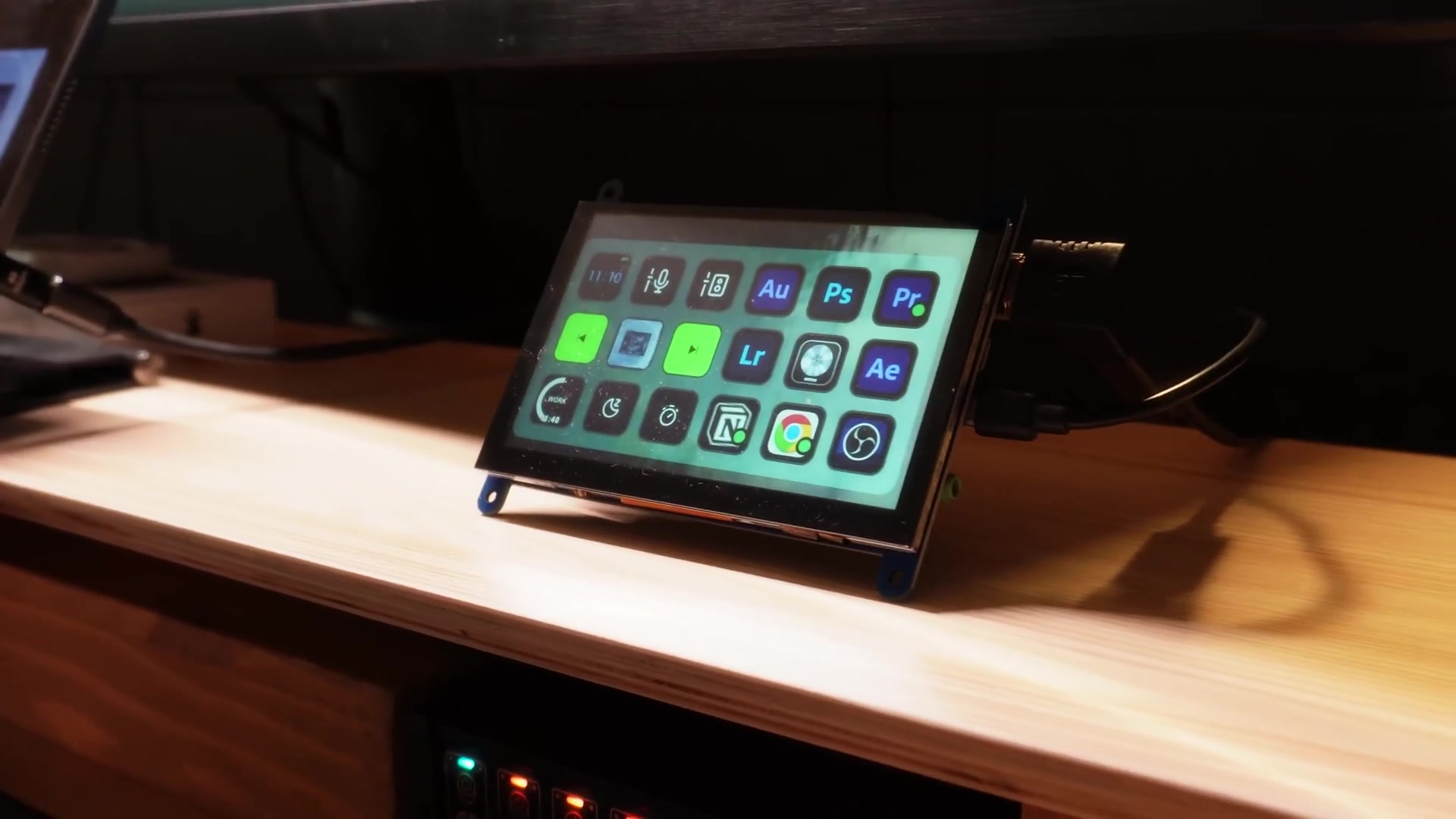
Nick's video demonstrates both an exciting practical hack and the underlying seams in the current experience. The experiment shows how a low-cost touchscreen can function as a reliable macro pad on Windows, displaying video and accepting touch instantly. By installing Elgato's Stream Deck software, Nick discovered that Virtual Stream Deck was present but locked until a physical Stream Deck was connected.
This single rule drastically changes the arithmetic of the DIY build. The cheap touchscreen acts like a conventional touch monitor on Windows, with the Stream Deck app allowing a virtual panel to be resized to fit the small display. Icons can be assigned, and macros triggered by taps, all without an additional learning curve.
The software is where the customization power sits, and Nick took full advantage of this flexibility. He configured time and date tiles, mic and speaker toggles, media controls, a Pomodoro timer, app launch shortcuts, and even a page of video editing hot keys. This level of customization demonstrates why a software-defined macro pad is valuable when tailored to an individual's workflow.
However, two constraints decide whether this hack is clever or expensive: platform driver support and Elgato's unlocking requirement. Together, they can turn a $30 screen into a poor investment if you do not already own compatible hardware or the right operating system.
**The Constraints of Platform Driver Support**
The touchscreen behaved fully on Windows but did not register touch on macOS without extra drivers. This mismatch matters because a panel that works instantly on one platform can be functionally useless on another. In practice, this forces users to either limit themselves to a supported OS or spend time hunting for drivers that may not exist for new macOS versions.
**The Role of Elgato's Unlocking Requirement**
Elgato currently requires a physical Stream Deck to enable Virtual Stream Deck, effectively adding around $200 to the cost. This rule erodes the DIY savings and turns what could be an exciting practical hack into a costly detour unless Elgato changes its activation policy.
**Stream Deck Mobile: A Practical Alternative**
Stream Deck Mobile can replace a separate touchscreen and bypass the hardware unlock, but it comes with tradeoffs. Using a phone or tablet may introduce latency or wireless reliability issues for live workflows. For many users, however, it is the least expensive and most reliable fallback.
**The Tradeoff Between Cost and Integrated Reliability**
Comparing Virtual Stream Deck on a cheap touchscreen with a physical Stream Deck reveals a tradeoff between cost and integrated reliability. Hardware models bundle guaranteed driver support, tactile buttons, and a known activation path, while the virtual approach depends on OS drivers and vendor's licensing choices.
**The Bigger Picture: Elgato's Commercial Strategy**
Elgato seems to be treating Virtual Stream Deck as an extension of its hardware business rather than a move to commoditize the control surface market. The larger question is commercial: if Elgato offers a paid license for Virtual Stream Deck, DIY builds gain clear economic sense.
**Who This Is For and Who This Is Not For**
Virtual Stream Deck is Elgato's software feature that lets the Stream Deck interface run as a virtual panel on compatible touchscreens or displays. It provides the same macro configuration and multi-page layouts as physical devices. However, it is not always a drop-in replacement for everyone due to compatibility issues.
**The Verdict**
The Virtual Stream Deck hack can be rewarding for tinkerers who accept the tradeoffs. However, for those prioritizing plug-and-play on Windows or seeking a clean, low-risk solution for production use, waiting for an official standalone license or buying a supported hardware Stream Deck may be the safer route.